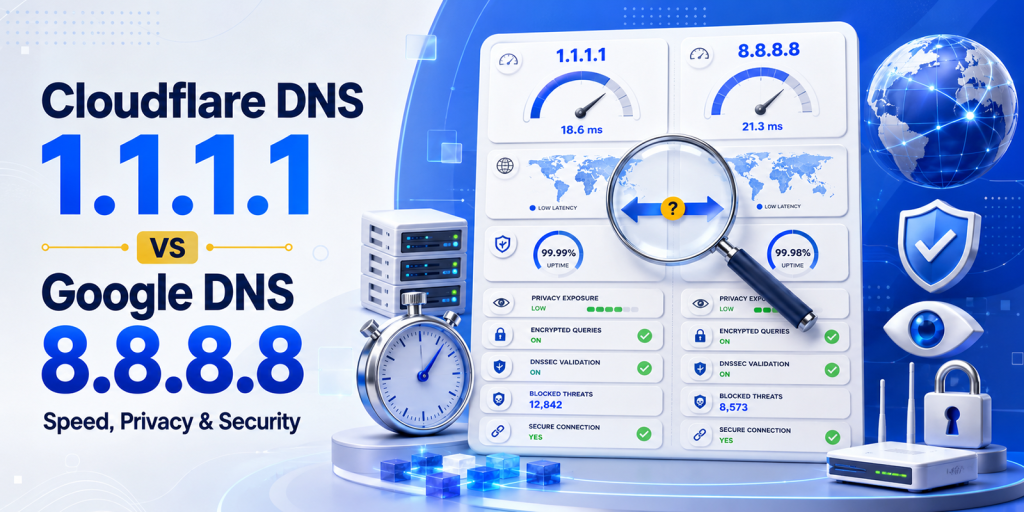
Choosing the right public DNS server can improve your browsing experience by making websites load faster, enhancing your online privacy, and adding an extra layer of security. Two of the most popular options are Cloudflare DNS (1.1.1.1) and Google Public DNS (8.8.8.8), but which one is the better choice in 2026?
While both are free, reliable, and support modern security standards like DNS-over-HTTPS (DoH), DNS-over-TLS (DoT), and DNSSEC, they differ in areas such as speed, privacy policies, malware protection, and overall performance. The best option depends on whether your priority is faster browsing, stronger privacy, family-safe filtering, or long-term reliability.
In this comprehensive comparison, we’ll break down Cloudflare 1.1.1.1 vs Google DNS 8.8.8.8 across performance, security, privacy, features, setup, and real-world use cases. You’ll also learn how to switch your DNS settings, test which resolver is fastest from your location, and use free HasheTools utilities to verify and troubleshoot your DNS configuration.
What is a DNS Resolver and Why Does Your Choice Matter?
Every time you type a web address, hashetools.com, google.com, youtube.com, your device needs to convert that human-readable name into a numerical IP address. This translation is handled by a DNS resolver: a server that processes your DNS query and returns the answer.
By default, you use your ISP’s resolver, and this is almost always the wrong choice. ISP DNS resolvers are typically slower than major public alternatives, may inject ads into error pages, log every domain you visit, and in some countries sell this browsing data to third parties.
Switching to a public DNS resolver like Cloudflare’s 1.1.1.1 or Google’s 8.8.8.8 gives you three immediate improvements: faster browsing (faster DNS lookups reduce page load time for first-time visits), better privacy (fewer parties logging your browsing history), and better security (support for DNSSEC, DoH, and malware blocking).
Cloudflare 1.1.1.1 Complete Overview
Cloudflare launched its public DNS resolver on April 1, 2018, a date that led many to initially dismiss it as an April Fools’ joke. It was not. Within days, it became the world’s fastest public DNS resolver, a position it has maintained continuously.
Cloudflare is the world’s largest CDN and network security company, operating in over 300 cities globally. Its DNS resolver runs on the same global Anycast network as its CDN, meaning DNS queries are answered from the nearest data centre to you, minimising round-trip latency.
| Attribute | Cloudflare 1.1.1.1 |
|---|---|
| Primary IPv4 | 1.1.1.1 |
| Secondary IPv4 | 1.0.0.1 |
| Primary IPv6 | 2606:4700:4700::1111 |
| Secondary IPv6 | 2606:4700:4700::1001 |
| Launched | April 1, 2018 |
| Operated by | Cloudflare, Inc. (San Francisco, CA) |
| Global PoPs | 300+ cities worldwide |
| DNSSEC validation | Yes |
| DNS-over-HTTPS (DoH) | Yes, https://cloudflare-dns.com/dns-query |
| DNS-over-TLS (DoT) | Yes, tls://1dot1dot1dot1.cloudflare-dns.com |
| IP logging | No persistent IP logging; transient logs are wiped within 24 hours |
| Independent audit | Yes, annual KPMG audit of privacy practices, results published |
| Malware blocking | Yes, via 1.1.1.2 / 1.0.0.2 |
| Adult content filter | Yes, via 1.1.1.3 / 1.0.0.3 |
| Average speed (global) | ~11ms (DNSPerf 2026) |
Cloudflare’s Privacy Commitment: What Makes It Unique
Cloudflare made a privacy commitment at launch that no other major DNS provider has matched: it pledged never to write querying IP addresses to persistent storage, to wipe all transient operational logs within 24 hours, and to submit its practices to an annual third-party audit by KPMG. The KPMG audit reports are published publicly, providing verifiable evidence that Cloudflare’s stated practices match its actual operations. Cloudflare’s core business is network infrastructure, not advertising; there is no financial incentive to monetise your DNS query data.
Google DNS 8.8.8.8 Complete Overview
Google Public DNS launched on December 3, 2009, with the memorable IP addresses 8.8.8.8 and 8.8.4.4. At the time, it was a revelation: the first major public alternative to ISP-provided DNS, immediately faster and more reliable than what most users had access to.
Fifteen years later, Google Public DNS remains the world’s most widely used public resolver by query volume. It runs on Google’s global infrastructure, the same network backbone that powers Gmail, YouTube, and Google Search, with resolver instances distributed across Google’s data centres worldwide.
| Attribute | Google DNS 8.8.8.8 |
|---|---|
| Primary IPv4 | 8.8.8.8 |
| Secondary IPv4 | 8.8.4.4 |
| Primary IPv6 | 2001:4860:4860::8888 |
| Secondary IPv6 | 2001:4860:4860::8844 |
| Launched | December 3, 2009 |
| Operated by | Google LLC (Mountain View, CA) |
| Global PoPs | Distributed across Google’s worldwide data center network |
| DNSSEC validation | Yes |
| DNS-over-HTTPS (DoH) | Yes https://dns.google/dns-query |
| DNS-over-TLS (DoT) | Yes tls://dns.google |
| IP logging | Transient logs are kept up to 48 hours; some aggregated data is kept longer |
| Independent audit | No public independent audit of DNS privacy practices |
| Malware blocking | No dedicated filtering endpoint |
| Adult content filter | No dedicated filtering endpoint |
| Average speed (global) | ~14ms (DNSPerf 2026) |
Google DNS and Privacy: A Nuanced Picture
Google states that Google Public DNS is not used for advertising and that temporary logs are deleted within 24–48 hours. However, Google does retain some aggregated, anonymised data for longer periods for performance analysis. The critical difference from Cloudflare is that Google’s core business is advertising built on data, creating a structural incentive that Cloudflare simply does not have. Google does not submit its DNS privacy practices to an independent public audit. For users already fully embedded in the Google ecosystem (Gmail, Chrome, Google Workspace), switching away from Google DNS for privacy reasons has diminishing returns; Google already has extensive data about your browsing via other channels.
Head-to-Head: Full Feature Comparison
Here is a complete side-by-side comparison across every dimension that matters. Highlighted cells indicate the winner in each category.
| 🟠 Cloudflare 1.1.1.1 | Category | 🔵 Google DNS 8.8.8.8 |
| 1.1.1.1 / 1.0.0.1 | Primary / Secondary IP | 8.8.8.8 / 8.8.4.4 |
| ~11ms global average | Speed (DNS query time) | ~14ms global average |
| 2–5ms faster in most regions | Speed Advantage | Slower in 90%+ of locations |
| 300+ cities, Anycast | Global Network | Google’s worldwide data centres |
| No persistent IP logging | IP Address Logging | Transient logs up to 48 hours |
| Yes, KPMG published | Independent Privacy Audit | No public audit |
| Core business: networking | Business Model / Data Incentive | Core business: advertising |
| Yes | DNSSEC Validation | Yes |
| Yes | DNS-over-HTTPS (DoH) | Yes |
| Yes | DNS-over-TLS (DoT) | Yes |
| 1.1.1.2 / 1.0.0.2 | Malware Blocking Endpoint | No dedicated endpoint |
| 1.1.1.3 / 1.0.0.3 | Family / Adult Content Filter | No dedicated endpoint |
| iOS, Android app + WARP | Mobile App / VPN | No dedicated DNS app |
| Since 2018 (7+ years) | Track Record | Since 2009 (15+ years) |
| Excellent, rare outages | Reliability / Uptime | Exceptional, near-perfect record |
| Google Workspace compatible | Ecosystem Integration | Deep Google ecosystem integration |
| Free | Cost | Free |
Score: Cloudflare wins 7 categories, Google wins 3 categories, Tie on 5 categories.
Speed Comparison: The Real Numbers
DNS speed is location-dependent; the closest resolver to you physically is usually the fastest for you. That said, Cloudflare consistently leads Google in global independent benchmarks due to its denser network footprint.
Independent Benchmark Results (DNSPerf, 2026)
| Region | Cloudflare 1.1.1.1 | Google 8.8.8.8 | Cloudflare Advantage |
|---|---|---|---|
| Global average | ~11ms | ~14ms | ~3ms faster |
| North America | ~5ms | ~7ms | ~2ms faster |
| Europe | ~6ms | ~19ms | ~13ms faster |
| Asia Pacific | ~12ms | ~15ms | ~3ms faster |
| Latin America | ~25ms | ~28ms | ~3ms faster |
| Middle East | ~30ms | ~35ms | ~5ms faster |
What These Numbers Mean in Practice
For cached queries (popular domains like google.com, youtube.com, amazon.com that are already in the resolver’s cache): both return results in under 5ms, and the difference is imperceptible.
For uncached queries (first-time lookups of less-visited domains), Cloudflare’s advantage is most meaningful, 10–15% faster globally, with much larger differences in regions like Europe where Cloudflare’s network density gives it a geographic advantage.
For complex pages (20+ resource domains loaded per page), the advantage compounds, saving 3ms per lookup across 20 lookups saves 60ms of total page load time, which is measurable and noticeable.
Does DNS Speed Affect Gaming Ping?
DNS only affects the initial connection lookup, not ongoing game latency. Once your game client connects to the server IP, DNS is no longer involved. DNS speed will not reduce your in-game ping or solve routing lag. It will, however, reduce the time it takes to find and connect to a server initially and may reduce connection timeouts when servers change IPs. For gaming, Cloudflare 1.1.1.1 is generally recommended as primary, but if you’re experiencing high ping in-game, DNS is not the cause.
Why Cloudflare Is Faster
- Denser network footprint: Cloudflare operates in 300+ cities, more than any other DNS provider. More PoPs means a resolver is statistically closer to you, reducing round-trip latency.
- Purpose-built DNS hardware: Cloudflare’s DNS resolvers run on hardware purpose-built and optimised specifically for DNS workloads. Google’s infrastructure is more general-purpose.
- Aggressive response compression: Cloudflare uses packet compression techniques that reduce DNS response sizes by 10–15% compared to Google, reducing transmission time
- Anycast routing: Both use Anycast, but Cloudflare’s more granular PoP distribution means queries reach a resolver with fewer network hops
Privacy Comparison: Who Knows What You Browse?
This is where the two resolvers differ most meaningfully, and where the choice matters beyond raw performance.
When you make a DNS query, you reveal your IP address and the domain you’re looking up to the DNS resolver. Over a day of browsing, this builds a complete picture of every website you visit. The question is: what does each provider do with that information?
| 🟠 Cloudflare: Privacy Policy | 🔵 Google: Privacy Policy |
| Never write querying IPs to persistent disk storage | Transient logs kept up to 48 hours |
| Transient operational logs are wiped within 24 hours | Some aggregated data is retained for longer periods |
| No DNS query data used for advertising (ever) | States’ DNS is not used for ad targeting, but not audited |
| Annual KPMG audit, results published publicly | No public independent audit of DNS privacy practices |
| Core business: network infrastructure (not advertising) | Core business: advertising built on user data |
| No financial incentive to monetise query data | Structural incentives exist to aggregate user data |
| APNIC research partnership (anonymised aggregate data only) | Deep integration with Google’s broader data ecosystem |
The bottom line: If privacy is a priority, Cloudflare’s commitment is structurally stronger, verified by an independent audit with published results. Google’s assurances are self-reported and unaudited. That said, if you are already signed into Chrome, Gmail, and YouTube, Google already has extensive data about your browsing via those channels; switching DNS resolvers has diminishing privacy returns for deep Google ecosystem users.
How Encrypted DNS (DoH/DoT) Affects Privacy
Both Cloudflare and Google support DNS-over-HTTPS (DoH) and DNS-over-TLS (DoT), which encrypt your DNS queries in transit. This prevents:
- Your ISP from seeing what domains you visit
- Man-in-the-middle attackers on public Wi-Fi intercept DNS queries
- Network observers are building browsing profiles from your DNS traffic
Important: Encrypted DNS (DoH/DoT) prevents your ISP from seeing your queries, but it doesn’t prevent the DNS resolver (Cloudflare or Google) from seeing them. Your queries are encrypted from your device to the resolver, but the resolver must decrypt them to process them. This is why the resolver’s privacy policy matters even when using DoH/DoT.
Security Comparison: DNSSEC, DoH, DoT & Filtering
DNSSEC Cache Poisoning Protection
Both Cloudflare and Google validate DNSSEC signatures. When a domain has DNSSEC enabled, both resolvers will cryptographically verify that DNS records are authentic and reject forged responses, protecting against cache poisoning attacks.
The adoption caveat: DNSSEC validation by the resolver only helps if the domain itself has DNSSEC enabled. Fewer than 25% of domains have DNSSEC configured. Check your domain’s DNSSEC status with HasheTools DNS Lookup.
Encrypted DNS Protocols
| Protocol | Cloudflare 1.1.1.1 | Google DNS 8.8.8.8 |
|---|---|---|
| DNS-over-HTTPS (DoH) | https://cloudflare-dns.com/dns-query | https://dns.google/dns-query |
| DNS-over-TLS (DoT) | tls://1dot1dot1dot1.cloudflare-dns.com | tls://dns.google |
| Port | DoH: 443 (HTTPS) | DoT: 853 | DoH: 443 (HTTPS) | DoT: 853 |
| Browser DoH | Built into Firefox, Chrome, Edge, and Brave | Built into Chrome and others |
Malware Blocking & Content Filtering
This is a significant differentiator. Cloudflare offers dedicated DNS endpoints that block categories of harmful content at the DNS level, no software required:
| Endpoint | Cloudflare | |
|---|---|---|
| Standard DNS | 1.1.1.1 / 1.0.0.1 | 8.8.8.8 / 8.8.4.4 |
| Malware blocking | 1.1.1.2 / 1.0.0.2 | No dedicated endpoint |
| Family filtering | 1.1.1.3 / 1.0.0.3 | No dedicated endpoint |
| Enterprise features | Cloudflare Gateway (paid) | Google Cloud DNS / Safe Browsing API |
For families and businesses: Cloudflare’s filtering endpoints are a significant advantage. Switching a home router to 1.1.1.2 (malware) or 1.1.1.3 (malware + adult content) provides free network-level content filtering for every device on the network, including smartphones, smart TVs, and game consoles, with no per-device software required.
DDoS Protection
Both Cloudflare and Google operate at the scale required to absorb DNS-targeted DDoS attacks without service interruption. Cloudflare specifically is the world’s largest DDoS mitigation provider; its DNS infrastructure is hardened against the largest volumetric attacks ever recorded. For enterprise users, Cloudflare Gateway provides additional threat intelligence, DNS firewall capabilities, and logging suitable for compliance requirements.
Reliability & Uptime Comparison
Both resolvers offer exceptional reliability that far exceeds typical ISP DNS servers. The question is which has the stronger track record.
| 🟠 Cloudflare 1.1.1.1 Reliability | 🔵 Google 8.8.8.8 Reliability |
| Launched in 2018, with 7 years of production operation | Launched in 2009, 15+ years of operation |
| Generally excellent uptime across all regions | Exceptional uptime track record over a longer timeframe |
| Notable outage: June 2022 configuration error (~1 hour) | Fewer notable outages than Cloudflare historically |
| Fully recovered and improved monitoring post-incident | Backed by Google’s multi-redundant global infrastructure |
| Some regional variability in uptime consistency | Very consistent across all regions globally |
| Real-time status: cloudflarestatus.com | Real-time status: google.com/appsstatus |
Recommendation: Use Cloudflare 1.1.1.1 as your PRIMARY and Google 8.8.8.8 as your SECONDARY DNS. Your device automatically falls back to the secondary if the primary is unreachable. This gives you Cloudflare’s speed and privacy advantages in normal operation, with Google’s battle-tested infrastructure as a failsafe.
The ‘More DNS Servers = Faster’ Myth
A common misconception is that adding more DNS servers speeds things up. In reality, your device queries the primary server and only falls back to the secondary if the primary doesn’t respond within a timeout period (typically 2–5 seconds). Using your secondary adds latency, not speed. Set both primary and secondary to Cloudflare addresses (1.1.1.1 and 1.0.0.1) for the fastest experience, or use Cloudflare primary and Google secondary for speed + maximum failover reliability.
Additional DNS Options: Cloudflare Variants & Competitors
Cloudflare’s Full DNS Family
| Service | IP Addresses | What It Does |
|---|---|---|
| Standard DNS | 1.1.1.1 / 1.0.0.1 | Fast, private DNS with no filtering |
| Malware Blocking | 1.1.1.2 / 1.0.0.2 | Blocks known malware and phishing domains at the DNS level |
| Family Filtering | 1.1.1.3 / 1.0.0.3 | Blocks malware + adult/explicit content. Ideal for families and schools |
| Cloudflare WARP | App-based | DNS + VPN layer via the 1.1.1.1 mobile/desktop app |
| Cloudflare Gateway | Enterprise (paid) | Full DNS firewall, threat intelligence, analytics, and compliance logging |
Other Worthy Competitors
| Provider | IP Address | Best For |
|---|---|---|
| Quad9 | 9.9.9.9 | Security-first users: blocks known malicious domains by default, strong privacy policy, non-profit operated |
| OpenDNS | 208.67.222.222 | Families and businesses: highly customisable filtering categories, long track record |
| NextDNS | Personalised | Power users: per-device filtering rules, detailed analytics, ad blocking, full privacy controls |
| Mullvad DNS | 194.242.2.2 | Maximum privacy: no logging, no filtering, minimal infrastructure footprint |
| AdGuard DNS | 94.140.14.14 | Ad blocking at DNS level: blocks ads and trackers network-wide without browser extensions |
| ISP DNS | Auto-assigned | Not recommended: typically slow, may log data and inject ads into error pages |
Which DNS Should You Use?
Standard users: Cloudflare 1.1.1.1 primary, Google 8.8.8.8 secondary.
Privacy priority: Cloudflare 1.1.1.1 or Mullvad DNS.
Family / parental controls: Cloudflare 1.1.1.3 or OpenDNS.
Security priority (malware blocking): Cloudflare 1.1.1.2 or Quad9 9.9.9.9.
Power users (custom filtering + analytics): NextDNS.
Enterprise: Cloudflare Gateway or NextDNS Business.
How to Switch Your DNS Step-by-Step for Every Device
Recommended Settings
| Cloudflare 1.1.1.1 Setup | Google DNS 8.8.8.8 Setup |
| Primary: 1.1.1.1 | Primary: 8.8.8.8 |
| Secondary: 1.0.0.1 | Secondary: 8.8.4.4 |
| IPv6 Primary: 2606:4700:4700::1111 | IPv6 Primary: 2001:4860:4860::8888 |
| IPv6 Secondary: 2606:4700:4700::1001 | IPv6 Secondary: 2001:4860:4860::8844 |
Windows 11 / 10
- Open Settings → Network & Internet → click your active connection (Wi-Fi or Ethernet)
- Scroll down to DNS server assignment → click Edit
- Change from Automatic (DHCP) to Manual
- Enable IPv4, enter Primary DNS: 1.1.1.1, Secondary DNS: 1.0.0.1
- Click Save, changes take effect immediately
| Windows alternative via Command Prompt (run as Administrator) |
| # Set DNS via netsh (replace ‘Wi-Fi’ with your interface name)
netsh interface ip set dns “Wi-Fi” static 1.1.1.1 netsh interface ip add dns “Wi-Fi” 1.0.0.1 index=2 # Flush DNS cache to clear old entries ipconfig /flushdns # Verify new DNS settings nslookup hashetools.com |
macOS (Monterey, Ventura, Sonoma, Sequoia)
- Open System Settings (or System Preferences) → Network
- Click your active connection → Details (or Advanced)
- Click the DNS tab
- Click + to add DNS servers: 1.1.1.1, then 1.0.0.1
- Remove your ISP’s DNS servers from the list
- Click OK → Apply
| macOS, via Terminal |
| # Set DNS on Wi-Fi interface
networksetup -setdnsservers Wi-Fi 1.1.1.1 1.0.0.1 # Flush DNS cache (macOS Monterey+) sudo dscacheutil -flushcache; sudo killall -HUP mDNSResponder # Verify nslookup hashetools.com 1.1.1.1 |
Linux (Ubuntu / Debian)
| Ubuntu, using systemd-resolved (recommended) |
| # Edit resolved.conf
sudo nano /etc/systemd/resolved.conf # Add or update these lines: [Resolve] DNS=1.1.1.1 1.0.0.1 FallbackDNS=8.8.8.8 8.8.4.4 DNSOverTLS=yes # Restart the service sudo systemctl restart systemd-resolved # Verify resolvectl status | grep ‘DNS Servers’ |
Android
- Open Settings → Network & Internet (or Connections)
- Tap Private DNS
- Select the Private DNS provider hostname
- Enter: 1dot1dot1dot1.cloudflare-dns.com (for Cloudflare) or dns.google (for Google)
-
Tap Save; this enables DNS-over-TLS automatically on Android 9+
iOS / iPadOS
- Open Settings → Wi-Fi → tap the (i) next to your network
- Scroll to DNS → tap Configure DNS → Manual
- Delete existing DNS servers → tap Add Server
- Add 1.1.1.1 and 1.0.0.1
- Tap Save
For system-wide DoH on iOS: Download the 1.1.1.1 app from Cloudflare (free); it installs a profile that enables encrypted DNS across all apps, not just Safari.
Router (affects all devices on your network)
- Log in to your router admin panel (usually 192.168.1.1 or 192.168.0.1)
- Navigate to WAN settings, DHCP settings, or DNS settings (varies by router brand)
- Replace the DNS server fields with 1.1.1.1 and 1.0.0.1
- Save and reboot the router
- All devices on your network will use the new DNS automatically
Router-level change is the most powerful option: It protects every device on your network, smartphones, smart TVs, IoT devices, and game consoles, without changing individual device settings. This is especially valuable for the Cloudflare 1.1.1.3 family filtering option.
How to Test Which DNS is Fastest From Your Location
Because DNS speed is location-dependent, the only way to know for certain which resolver is fastest for you is to test from your actual location. Here are the most reliable methods:
Method 1: Command Line (dig / nslookup)
| Test DNS response time from your location |
| # Time a query to Cloudflare DNS
dig @1.1.1.1 hashetools.com A +stats | grep “Query time” # Example output: ;; Query time: 8 msec # Time a query to Google DNS dig @8.8.8.8 hashetools.com A +stats | grep “Query time” # Example output: ;; Query time: 14 msec # Run multiple times and average for accuracy for i in {1..5}; do dig @1.1.1.1 google.com A +stats 2>&1 | grep “Query time”; done |
Method 2: HasheTools Ping Test
Use HasheTools’ Ping Test tool to measure round-trip latency to Cloudflare and Google DNS servers from different global locations. This gives you a proxy measure of DNS query time based on network distance.
Method 3: Online Benchmark Tools
| Tool | What It Does |
|---|---|
| DNSPerf (dnsperf.com) | Continuous global monitoring across 200+ locations. Shows historical and real-time performance rankings for all major public DNS providers. |
| DNS Speed Test (1.1.1.1/help) | Cloudflare’s own tool tests 1.1.1.1 performance from your browser and network location. |
| Namebench (open source) | Local tool that queries your ISP DNS, Google, Cloudflare, and others from your exact location and recommends the fastest for you. |
| GRC DNS Benchmark (Windows) | Detailed graphical benchmark of all DNS servers from your location. Shows minimum, mean, and maximum response times. |
| nslookup.io | An online tool that tests DNS propagation from global locations, useful for comparing resolver consistency. |
Location Matters More Than Global Rankings
DNSPerf’s global average shows Cloudflare faster than Google, but your individual result depends on your ISP’s network topology, your country’s peering agreements, and which Cloudflare and Google PoPs you’re geographically closest to. In a small number of regions, Google’s infrastructure may be physically closer to you and therefore faster. Always benchmark from your actual location before committing to a DNS server.
How HasheTools Can Help You Understand Your DNS
HasheTools provides free DNS lookup and diagnostic tools that help you understand, verify, and troubleshoot your DNS configuration, whether you’ve just switched resolvers or are investigating a performance issue.
| HasheTools Tool | How It Helps After Switching DNS |
|---|---|
| DNS Lookup: All Records | Verify that domain records are resolving correctly after switching resolvers. Check that A, MX, TXT, and CNAME records return expected values from global vantage points. |
| DNS Servers Lookup | Check which authoritative nameservers a domain uses, useful for understanding why a domain resolves differently across resolvers. |
| Ping Test | Measure round-trip latency to any IP address. Use this to compare real-world network distance to Cloudflare (1.1.1.1) vs Google (8.8.8.8) from your location. |
| Traceroute | Trace the full network path to 1.1.1.1 and 8.8.8.8. Shows how many hops each resolver is from your network; fewer hops generally means lower latency. |
| Reverse DNS Lookup | Verify that IP addresses reverse-resolve correctly. Useful for confirming that your mail server’s PTR record is intact after DNS changes. |
| DNS Lookup DNSKEY | Check if a domain has DNSSEC configured, which both Cloudflare and Google 8.8.8.8 will validate if present. |
| CNAME Lookup | Trace CNAME chains to confirm DNS resolution paths are correct after switching resolvers. CDN configurations sometimes behave differently across resolvers. |
| SMTP Test | Full email delivery test confirms that DNS-dependent email authentication (SPF, DKIM, PTR) works correctly with your new DNS configuration. |
Frequently Asked Questions
Will switching DNS make my internet faster overall?
DNS switching affects the time it takes to look up domain names, not your download speeds, upload speeds, or streaming bandwidth. The improvement is most noticeable when visiting websites for the first time (uncached lookups) or on pages that load resources from many different domains. For most users, switching from ISP DNS to Cloudflare or Google DNS saves between 50–150ms on initial page loads. This is meaningful for browsing responsiveness but won’t change video streaming quality or download speeds.
Can I use 1.1.1.1 and 8.8.8.8 together?
Yes, this is actually the recommended setup for most users. Set Cloudflare 1.1.1.1 as your primary DNS and Google 8.8.8.8 as your secondary. Your device will use Cloudflare for all queries in normal operation and automatically fall back to Google only if Cloudflare is unreachable. This gives you Cloudflare’s speed and privacy advantages 99.9%+ of the time, with Google’s proven reliability as a failsafe.
Does changing DNS affect my VPN?
Most VPNs override your DNS settings when connected, routing all DNS queries through their own servers to prevent DNS leaks. Changing your system DNS to 1.1.1.1 will have no effect while your VPN is active. When the VPN is disconnected, your system will use whichever DNS you configured. Some VPNs allow you to specify a custom DNS server; check your VPN client settings if you want to use Cloudflare DNS even when connected.
Is 1.1.1.1 safe to use?
Yes. Cloudflare’s 1.1.1.1 is one of the most widely used and independently verified public DNS services in the world. It supports DNSSEC validation (protecting against cache poisoning attacks), DNS-over-HTTPS and DNS-over-TLS (protecting queries in transit), and has annual KPMG privacy audits confirming its data handling practices. It is operated by Cloudflare, one of the world’s largest internet infrastructure companies.
Will 1.1.1.1 block any websites?
The standard 1.1.1.1 resolver does not block any websites; it resolves all valid domain names without filtering. If you want filtering, use 1.1.1.2 (blocks known malware and phishing domains) or 1.1.1.3 (blocks malware plus adult/explicit content). These filtering variants use Cloudflare’s threat intelligence to block DNS queries for known harmful domains at the network level.
What is the difference between 1.1.1.1 and 1.0.0.1?
Both 1.1.1.1 and 1.0.0.1 are Cloudflare DNS resolvers with identical functionality and privacy policies. They are provided as primary and secondary addresses for redundancy; if one is unreachable, your system tries the other. In practice, the performance difference between them is negligible as they route to the same Cloudflare infrastructure globally.
Does Google DNS work with Google Workspace?
Google DNS is technically compatible with Google Workspace, but there is no direct integration advantage. Google DNS resolves DNS queries the same way as any other public resolver. Google Workspace mail routing and DNS settings depend on MX records and SPF/DKIM/DMARC configuration on your domain, not on which DNS resolver your devices use. You can use Cloudflare DNS on devices while using Google Workspace email with no issues.
How do I know my DNS change worked?
After changing DNS settings, verify by: (1) flushing your DNS cache (ipconfig /flushdns on Windows, sudo dscacheutil -flushcache on Mac); (2) visiting 1.1.1.1/help in your browser; it shows which DNS resolver you’re using; (3) running nslookup hashetools.com in a terminal; the ‘Server’ field in the response should show your new resolver’s address. HasheTools DNS Lookup also lets you verify that domains resolve correctly from multiple global locations.
Conclusion:
Both Cloudflare 1.1.1.1 and Google Public DNS (8.8.8.8) are excellent alternatives to your ISP’s default DNS, offering faster performance, better security, and support for modern standards like DNSSEC, DNS-over-HTTPS (DoH), and DNS-over-TLS (DoT).
If your priorities are speed, privacy, and built-in malware or family filtering, Cloudflare 1.1.1.1 is the better choice for most users. Its extensive global network, strong privacy commitment, and free filtering options make it an ideal DNS resolver for home users, businesses, and families alike.
On the other hand, if you value a long-established reliability record or already rely heavily on the Google ecosystem, Google Public DNS (8.8.8.8) remains a dependable and high-performing option.
For the best balance of performance and redundancy, many users choose Cloudflare 1.1.1.1 as their primary DNS and Google 8.8.8.8 as their secondary DNS.
After changing your DNS settings, use HasheTools to verify that everything is working correctly. Our free DNS Lookup, Ping Test, Traceroute, Reverse DNS Lookup, and DNSSEC Checker tools can help you confirm your DNS configuration, troubleshoot issues, and monitor performance with confidence.