DNS is one of the most critical systems on the internet, yet it remains one of the least protected. Every time someone visits your website, sends you an email, or connects to your services, they rely on DNS to get the correct destination. The problem? Traditional DNS offers no built-in way to verify whether the response it returns is legitimate or forged.
This is exactly the gap DNSSEC (Domain Name System Security Extensions) was designed to fill. By adding cryptographic signatures to DNS records, DNSSEC allows resolvers to verify that the data they receive is authentic and hasn’t been tampered with. It transforms DNS from a trust-based system into a verifiable one.
And yet, despite being available for over 20 years, most domains in 2026 are still vulnerable. In this guide, we’ll break down how DNSSEC works, why adoption remains low, and what risks you face if your domain isn’t protected.
What is DNSSEC?
DNSSEC stands for Domain Name System Security Extensions. It is an additive security layer for DNS that uses public-key cryptography to sign DNS records, allowing resolvers to verify that the records they receive are authentic and unaltered.
The core problem DNSSEC solves: DNS was designed to be fast and lightweight, not secure. A standard DNS response carries no proof of authenticity; a resolver receiving an answer has no built-in way to tell whether it came from the legitimate authoritative nameserver or from an attacker who injected a forged response. DNSSEC fixes this by turning DNS records into signed, verifiable data.
DNSSEC does NOT encrypt DNS traffic (that’s DNS-over-HTTPS or DNS-over-TLS). What it does instead is provide data integrity and origin authentication; you can verify what the answer says and who it came from, even though the data travels in plaintext.
The Analogy: DNSSEC as a Wax Seal: Imagine sending a letter through the postal system in medieval times. Anyone handling the letter could open it and replace its contents. Adding a wax seal doesn’t stop anyone from reading the letter, but it does let the recipient verify that the seal is unbroken, confirming the letter hasn’t been tampered with and truly came from the claimed sender. DNSSEC’s cryptographic signatures work on the same principle: they don’t hide the DNS data, but they make tampering detectable.
The DNS Vulnerability DNSSEC Solves
To understand why DNSSEC matters, you first need to understand how DNS can be attacked without it.
The Kaminsky Attack: DNS’s Worst Nightmare
In 2008, security researcher Dan Kaminsky revealed a fundamental vulnerability in DNS that sent shockwaves through the industry. His technique, now called the Kaminsky Attack, could poison a recursive resolver’s cache in seconds using a simple but devastating exploit.
How the Kaminsky Attack Works
- Attacker targets: Picks the victim’s resolver and a target domain
- Floods with queries: Queries for random.target.com subdomains
- Sends fake replies: Races to answer with forged DNS response
- Guesses txn ID: 16-bit space = 65,536 possibilities
- Poisons the cache: Fake record cached for full TTL duration
Why was it so dangerous? DNS transaction IDs are only 16 bits, meaning there are only 65,536 possible values. By querying for non-existent subdomains (which the resolver had to look up fresh each time) and flooding with forged responses, an attacker could statistically expect to guess the right transaction ID within seconds. Once poisoned, the forged record would be served to every user of that resolver for the duration of its TTL, potentially for hours or days.
The emergency patch, randomising source ports to add another ~16 bits of randomness, bought time but didn’t fundamentally solve the problem. DNSSEC is the definitive fix.
What an Unprotected DNS Response Looks Like
| Standard DNS response, no authentication, no verification |
| $ dig hashetools.com A
;; ANSWER SECTION: hashetools.com. 300 IN A 104.21.45.67 # This response contains: # ✓ The IP address (104.21.45.67) # ✗ No signature, could be from a legitimate server OR an attacker # ✗ No proof that the data hasn’t been modified in transit # ✗ No chain of trust back to any verified root # A forged response looks identical. The resolver cannot tell the difference. |
Who Is Actively Exploiting Unprotected DNS in 2026? Nation-state actors (documented campaigns from Iran, Russia, China, and North Korea targeting government and critical infrastructure domains), ransomware operators using DNS hijacking for initial access and C2 communication, phishing campaigns using lookalike domains that exploit unprotected resolvers, and malware using DNS cache poisoning to redirect software update servers to deliver malicious payloads. If your domain lacks DNSSEC, any of these actors can forge records for your domain against unvalidating resolvers.
How DNSSEC Works: Cryptographic Signatures Explained
DNSSEC adds digital signatures to DNS records using asymmetric public-key cryptography, the same mathematical foundation used in HTTPS certificates and code signing.
The Basic Mechanism
- The zone owner (your DNS provider or authoritative server) generates a key pair: a private signing key and a public verification key
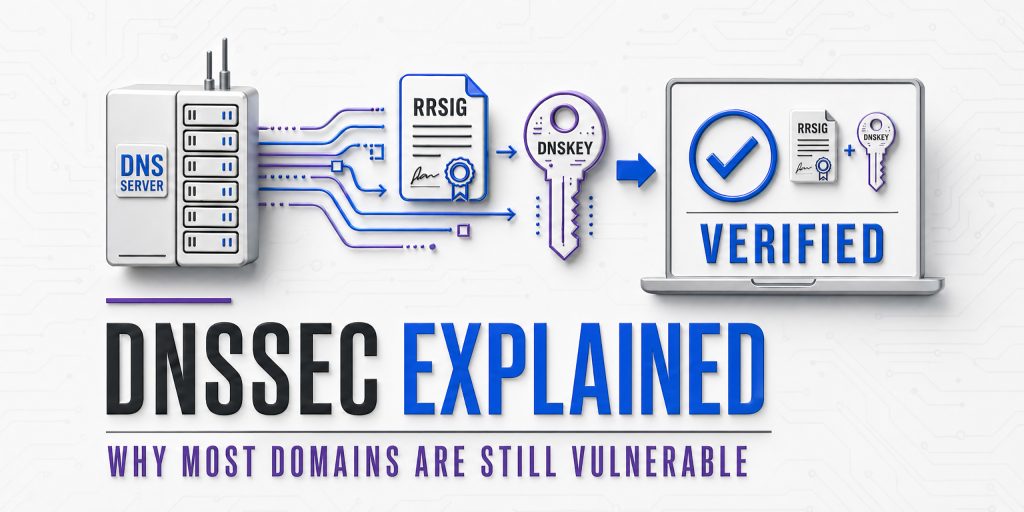
- Every DNS record set (all A records for your domain, all MX records, etc.) is signed using the private key, producing a digital signature stored in an RRSIG record
- The public key is published in the DNS zone itself, in a DNSKEY record, so anyone can retrieve and use it to verify signatures
- When a resolver receives a DNS response, it retrieves the DNSKEY and verifies the RRSIG signature. If the signature is valid, the data is authentic; if the signature is invalid or missing, the response is rejected
- The public key itself is verified by a digital signature from the parent zone, creating a chain of trust all the way back to the signed DNS root
What a DNSSEC-Protected Response Looks Like
| DNSSEC-enabled DNS response, with cryptographic proof |
| $ dig hashetools.com A +dnssec
;; ANSWER SECTION: hashetools.com. 300 IN A 104.21.45.67 hashetools.com. 300 IN RRSIG A 13 2 300 20261231000000 ( 20261201000000 12345 hashetools.com. Xy9zABCDEFGH1234… ) # Digital signature ;; ADDITIONAL SECTION: hashetools.com. 3600 IN DNSKEY 257 3 13 ( mdsswUyr3DPW132mOi8V9xESWE8jTo0d… ) # Zone’s public key # This response contains: # ✓ The IP address (104.21.45.67) # ✓ RRSIG: cryptographic signature over the A record # ✓ DNSKEY: public key to verify the signature # ✓ Chain of trust verified back to the DNS root # ✓ Any tampering invalidates the signature, immediately detectable |
The Two Key Types in DNSSEC
DNSSEC uses two types of keys in a two-layer signing architecture:
| Key Type | Abbreviation | What It Signs / Purpose |
|---|---|---|
| Key Signing Key | KSK | Signs the ZSK DNSKEY record. Longer-lived. Its hash (DS record) is stored in the parent zone to create the chain of trust. |
| Zone Signing Key | ZSK | Signs all the actual DNS records in the zone (A, MX, TXT, CNAME, etc.). Rotated more frequently than the KSK. |
Why two keys? Separating the roles allows the ZSK (which signs many records and must be used frequently) to be rotated often without changing the KSK (which is anchored in the parent zone via a DS record and is more complex to rotate). This is analogous to having a master key and working keys; the working key can be changed without replacing the master.
The DNSSEC Record Types You Need to Know
DNSSEC introduces four new DNS record types that work together to provide authentication. Understanding them is essential for troubleshooting and configuration.
| Record Type | Full Name | What It Contains / Does |
|---|---|---|
| DNSKEY | DNS Public Key | Stores the zone’s public keys (ZSK and KSK). Published in the DNS zone itself. Resolvers use this to verify RRSIG signatures. |
| RRSIG | Resource Record Signature | The digital signature over a set of DNS records (called an RRset). One RRSIG per record type per zone. Signed with the ZSK. |
| DS | Delegation Signer | A hash of the child zone’s KSK DNSKEY. Published in the PARENT zone. Creates the link between parent and child in the chain of trust. |
| NSEC / NSEC3 | Next Secure / Next Secure v3 | Proves that a domain or record type does NOT exist. Prevents attackers from returning forged NXDomain responses. NSEC3 hashes the names for privacy. |
DNSKEY Record Anatomy
| DNSKEY record: your zone’s public key |
| Flags: 257 # 257 = KSK (Zone Signing Key + SEP flag), 256 = ZSK |
| Protocol: 3 # Always 3 for DNSSEC |
| Algorithm: 13 # 13 = ECDSA P-256 with SHA-256 (recommended in 2026) |
| PublicKey: mdsswUyr3… # Base64-encoded public key, used to verify RRSIG signatures |
RRSIG Record Anatomy
| RRSIG records the digital signature over your DNS records |
| TypeCovered: A # Record type this signature covers |
| Algorithm: 13 # Must match the DNSKEY algorithm |
| Labels: 2 # Number of domain labels in the name |
| TTL: 300 # Original TTL of the signed records |
| Expiration: 20261231000000 # Signature validity end (YYYYMMDDHHMMSS) |
| Inception: 20261201000000 # Signature validity start |
| KeyTag: 12345 # Identifies which DNSKEY was used to sign |
| Signature: Xy9zABCD… # The base64-encoded digital signature |
DS Record Anatomy
| DS record: published in the PARENT zone (your registrar / TLD) |
| KeyTag: 12345 # Matches the KeyTag in the child’s KSK DNSKEY |
| Algorithm: 13 # Hash algorithm (13 = ECDSA) |
| DigestType: 2 # 2 = SHA-256 (recommended) |
| Digest: AB12CD34… # SHA-256 hash of the child zone’s KSK DNSKEY |
The Chain of Trust: From Root to Your Domain
DNSSEC’s power comes from a hierarchical chain of trust that extends from a single globally trusted root, the DNS Root Zone, all the way down to your individual domain records. Every link in this chain is cryptographically verified.
| DNS Root Zone ( . )
Trust Anchor, maintained by ICANN, signed by the Root KSK (rotated by ICANN, last major rotation 2018, upgraded 2026) |
| │ Root KSK signs Root ZSK │ Root ZSK signs .com DS record |
| TLD Zone ( .com / .org / .net / etc. )
Operated by Verisign (.com), PIR (.org), etc. Contains DS records for registered domains. |
| │ TLD nameserver publishes DS record → links to your domain’s KSK |
| Your Domain ( yourdomain.com )
Your DNS zone contains DNSKEY records (KSK + ZSK) and RRSIG signatures over every record set. |
| │ ZSK signs every DNS record in your zone (A, MX, TXT, CNAME, NS, SOA…) |
| Individual DNS Records (A, MX, TXT, CNAME…)
Each record set has a corresponding RRSIG. Resolver validates RRSIG → DNSKEY → DS → TLD → Root. Chain complete. |
Breaking the chain: If any link in this chain is missing or invalid, if your registrar didn’t submit your DS record to the TLD, if your RRSIG has expired, if the algorithm in your DNSKEY doesn’t match your RRSIG, the entire DNSSEC validation fails. DNSSEC-validating resolvers will refuse to serve the response, resulting in SERVFAIL errors for your users.
Why Most Domains Still Don’t Have DNSSEC in 2026
DNSSEC was standardised in RFC 4033–4035 in 2005. In 2026, two decades later, fewer than 25% of registered domains have it enabled. This is one of the most persistent adoption failures in cybersecurity. Here’s why:
Operational Complexity
DNSSEC requires managing key pairs, signing zones, submitting DS records to registrars, coordinating key rollovers, and monitoring signature expiry. For organisations without dedicated DNS expertise, this is daunting.
Signature Expiry Risk
RRSIG records have an expiration date, typically 30 days. If signatures aren’t refreshed before expiry (automatically by the DNS provider or manually), the domain goes into SERVFAIL for all validating resolvers. This ‘break everything’ failure mode makes operations teams reluctant to enable it.
Key Rollover Complexity
Rotating DNSSEC keys safely requires a precise multi-step dance between the child zone and the parent (registrar). A mistimed rollover breaks the chain of trust. Automated key management has improved but remains error-prone in many environments.
Registrar / Provider Support Gaps
Not all DNS providers and registrars support DNSSEC, or support it well. Many budget hosting providers, legacy DNS platforms, and smaller registrars offer no DNSSEC support at all, leaving their customers unable to enable it regardless of intent.
Invisible Protection
DNSSEC protects against attacks that most domain owners have never personally experienced. The risk is real but invisible; unlike an SSL error (which shows a red browser warning), a DNS cache poisoning attack is completely invisible to the victim. Low perceived urgency → low adoption.
No Direct Business Incentive
SSL certificates have a visible browser padlock that drives adoption through customer-facing consequences. DNSSEC has no equivalent visible signal. There is no ranking boost, no browser warning for its absence, and no direct customer-facing benefit that organisations can point to when justifying the operational cost.
Global Coordination Required
DNSSEC requires both the domain owner, the registrar, and the TLD operator to support and correctly configure it. A failure at any party breaks the chain. Coordinating across these three separate entities, especially for legacy domains, creates inertia.
2026 Adoption Trends: A Reason for Optimism: While overall adoption remains low, the trajectory is improving. Cloud-managed DNS providers (Cloudflare, AWS Route 53, Google Cloud DNS) now enable DNSSEC with a single click and handle all key management automatically. The ccTLD adoption rate is much higher than that of commercial domains. .gov domains in the US are mandated to use DNSSEC. ICANN’s 2026 root zone upgrades are prompting renewed attention to DNSSEC at all levels of the hierarchy.
DNSSEC Advantages and Limitations
| Advantages of DNSSEC | Challenges & Limitations |
| Eliminates DNS cache poisoning attacks against your domain | Does NOT encrypt DNS traffic (use DoH/DoT for that) |
| Provides cryptographic proof of DNS record authenticity | Does NOT prevent DNS hijacking at the registrar level |
| Protects against Kaminsky-style forged response injection | Misconfiguration causes a complete domain outage (SERVFAIL) |
| Enables DANE, binding TLS certificates to DNS records | RRSIG signatures expire and require active maintenance |
| Enables SSHFP, verifying SSH host keys via DNS | Key rollovers require careful coordination with the registrar |
| Provides authenticated denial of existence (NSEC/NSEC3) | Increases DNS response size (adds RRSIG + DNSKEY records) |
| Required for some government and compliance frameworks | Not all DNS providers/registrars support it |
| Free to enable, no ongoing certificate cost | NSEC records can enable zone enumeration (use NSEC3) |
| Increasingly automated by major DNS providers | Amplification: larger responses can be abused in DDoS |
| Protects users even when they can’t see it working | Low validator adoption limits end-to-end protection |
How to Check if Your Domain Has DNSSEC
Before configuring DNSSEC, verify your current status. There are multiple ways to check:
Method 1: HasheTools DNS Lookup
The quickest method for most users: go to hashetools.com, open the DNS Lookup tool, enter your domain, and look for DNSKEY and RRSIG records in the results. If they appear, DNSSEC is enabled. If they don’t, it is not.
Method 2: Command Line (dig)
| Check for DNSSEC records using dig |
| # Check for DNSKEY record (your zone’s public key)
dig yourdomain.com DNSKEY +short # If DNSSEC is enabled, you’ll see output like: # 257 3 13 mdsswUyr3DPW132mOi8V9xESWE8jTo0d… (KSK) # 256 3 13 oJMRESz5E4gYzS/q6XDrvU1/6STjwd1D… (ZSK) # Check for RRSIG records (signatures over your A record) dig yourdomain.com A +dnssec +short # DNSSEC enabled: returns A record AND RRSIG record # DNSSEC not enabled: returns only A record, no RRSIG # Check DS record (published at your registrar / TLD) dig yourdomain.com DS +short # If no DS record: chain of trust is broken, DNSSEC not propagated |
Method 3: DNSSEC Analyser Tools
| Full DNSSEC chain validation: online tools |
| # ICANN DNSSEC Analyser:
# https://dnssec-analyzer.verisignlabs.com/yourdomain.com # DNSViz, detailed visual chain of trust analysis: # https://dnsviz.net/d/yourdomain.com/dnssec/ # Cloudflare DNSSEC Debugger: # https://dnssec-debugger.verisignlabs.com/ # Look for: # Green checkmarks = valid chain of trust # Red X = broken link in chain # Yellow warning = configuration issue (often expiring signatures) |
Interpreting Your Results
| What You See | What It Means |
|---|---|
| DNSKEY + RRSIG records present, DS record in TLD | DNSSEC is fully enabled, and the chain of trust is intact. |
| DNSKEY + RRSIG records present, no DS record | DNSSEC is configured in the zone, but the DS record is not submitted to the registrar. Chain of trust broken, not validated. |
| No DNSKEY, no RRSIG records | DNSSEC is not enabled on your domain. All DNS responses are unauthenticated. |
| RRSIG records present but expired | Signatures have passed their validity date. Validating resolvers return SERVFAIL. The domain is effectively unreachable. |
| SERVFAIL when querying your domain | DNSSEC is configured but broken, expired signatures, missing DS record, algorithm mismatch, or failed key rollover. Urgent fix required. |
How to Enable DNSSEC: Step-by-Step Guide
The exact steps vary by DNS provider and registrar, but the fundamental process is the same for everyone. Here is the complete workflow:
Before You Start: Confirm that both your DNS provider (who hosts your DNS zone) and your domain registrar (where you registered the domain) support DNSSEC. They may be the same company (e.g., if you use Cloudflare for both) or different companies (e.g., GoDaddy as registrar, AWS Route 53 as DNS provider). If your DNS provider doesn’t support DNSSEC, you’ll need to migrate your DNS before enabling it.
Step 1: Enable DNSSEC Signing in Your DNS Provider
- Log in to your DNS provider’s dashboard
- Navigate to the DNS settings for your domain
- Find the DNSSEC option (usually labelled ‘DNSSEC’, ‘DNS Security’, or ‘DNSSEC Signing’)
- Enable DNSSEC signing, the provider will generate a KSK and ZSK, and begin signing your zone.
- The provider will display a DS record (containing the KeyTag, Algorithm, DigestType, and Digest). Copy this exactly; you’ll need it in Step 2
Step 2: Submit the DS Record to Your Registrar
- Log in to your domain registrar (where you purchased the domain)
- Navigate to the DNS or DNSSEC settings for your domain
- Find the ‘Add DS Record’ or ‘DNSSEC’ section
- Enter the DS record values provided by your DNS provider: Key Tag, Algorithm, Digest Type, Digest.
- Save the DS record; the registrar will publish it in the TLD zone
- Wait for propagation, DS records typically propagate within 1–48 hours
Step 3: Verify the Chain of Trust
| Verify your complete DNSSEC chain after configuration |
| # Step 1: Confirm DNSKEY is published
dig yourdomain.com DNSKEY +short # Should return 2 records: one KSK (flags=257), one ZSK (flags=256) # Step 2: Confirm DS record is in the TLD zone dig yourdomain.com DS +short # Should return your DS record, matches the KSK hash # Step 3: Confirm RRSIG is present on your A record dig yourdomain.com A +dnssec # Should return: A record + RRSIG record # Step 4: Full chain validation dig yourdomain.com A +sigchase +trusted-key=/etc/trusted-key.key # Or use DNSViz online for a visual chain check |
Step 4: Set Up Monitoring
- Monitor RRSIG expiry: RRSIG records have an expiration date. Your DNS provider should auto-renew them, but set up an alert in case auto-renewal fails.
- Monitor DS record consistency: Periodically verify that the DS record at your registrar matches your current KSK.
- Set up DNSSEC failure alerts: Tools like Zabbix, Nagios, or cloud monitoring services can alert you if your domain starts returning SERVFAIL.
- Use HasheTools DNS Lookup regularly: Quick periodic checks confirm DNSKEY and RRSIG records remain present and valid.
Key Rollover: The Critical Ongoing Operation: ZSK rotation should happen every 30–90 days. KSK rotation is less frequent (annually or as needed) but more complex; it requires updating the DS record at your registrar. Most managed DNS providers handle ZSK rotation automatically. KSK rotation typically requires manual action: generate new KSK → publish both old and new DNSKEY simultaneously (pre-publication) → update DS record at registrar → remove old DNSKEY after DS has propagated. Never remove the old DNSKEY before the new DS record has propagated globally.
DNSSEC by DNS Provider: Quick Reference
DNSSEC support and ease of configuration vary significantly by provider. This table covers the most commonly used DNS providers and registrars as of 2026:
| Provider | DNSSEC Support | Auto Key Mgmt | How to Enable |
|---|---|---|---|
| Cloudflare | Full | Automatic | DNS → DNSSEC tab → Enable DNSSEC. The DS record is displayed automatically. |
| AWS Route 53 | Full | Automatic | Hosted Zone → Enable DNSSEC Signing → Register DS with registrar. |
| Google Cloud DNS | Full | Automatic | Cloud DNS → Zone → DNSSEC → Enable. DS record provided. |
| Cloudflare Registrar | Full | Automatic | One-click if DNS is also on Cloudflare, DS is submitted automatically. |
| GoDaddy DNS | Partial | Manual keys | Domain Settings → DNS → DNSSEC. Must manage key rotation manually. |
| Namecheap | Partial | Limited | Advanced DNS → DNSSEC. Key management support varies by plan. |
| Name.com | Supported | Manual | Manage Domain → DNS Records → DNSSEC Records. |
| Porkbun | Supported | Auto if Porkbun DNS | Domain → Edit → DNSSEC. Auto if using Porkbun DNS. |
| cPanel / WHM | Depends | Provider-dependent | Depends on the hosting provider’s DNS server configuration. |
| Generic BIND | Full (manual) | Manual only | Use dnssec-keygen + dnssec-signzone. Requires significant expertise. |
| PowerDNS | Full | Auto-signing | pdnsutil secure-zone yourdomain.com, then submit the DS record. |
Recommendation: Use a Provider That Automates DNSSEC: The biggest cause of DNSSEC-related outages is expired RRSIG signatures that weren’t refreshed in time. Choosing a DNS provider that handles key generation, zone signing, and signature renewal automatically (Cloudflare, AWS Route 53, Google Cloud DNS) eliminates the most dangerous operational risks. If your current provider doesn’t support automatic DNSSEC management, consider migrating your DNS before enabling DNSSEC.
DNSSEC and Email Security: The Connection
DNSSEC has a direct and important relationship with email security, specifically through DANE (DNS-based Authentication of Named Entities), an extension that allows you to publish your mail server’s TLS certificate fingerprint in DNS and have it validated via DNSSEC.
What is DANE?
DANE (RFC 7671) allows you to publish a TLSA record in DNS that specifies which TLS certificate or Certificate Authority your mail server uses. Receiving mail servers that support DANE can verify this record, and reject connections if the certificate doesn’t match, even if the presented certificate is ‘valid’ according to traditional CA verification.
This closes a significant gap in email security: traditional STARTTLS encryption for email is opportunistic and can be stripped by a man-in-the-middle attacker. DANE makes TLS enforcement mandatory and verifiable.
| DANE TLSA record for email: published in DNSSEC-signed zone |
| # TLSA record for your mail server (MX record host)
# Format: _port._protocol.hostname TLSA usage selector matchingtype hash _25._tcp.mail.yourdomain.com. IN TLSA 3 1 1 ( AB12CD34EF56… ) # Usage 3 1 1 = DANE-EE: Domain-issued cert, SubjectPublicKeyInfo, SHA-256 # Requires: DNSSEC enabled on yourdomain.com + STARTTLS on your mail server |
DNSSEC + Email Authentication Stack
| Protocol | Role in Email Security |
|---|---|
| SPF | Authorises sending IPs for your domain (DNS TXT record, benefits from DNSSEC authentication) |
| DKIM | Cryptographically signs email messages (DNS TXT record, DNSSEC prevents forging of public key) |
| DMARC | Enforces SPF/DKIM policy and alignment (DNS TXT record, DNSSEC prevents policy tampering) |
| BIMI | Displays brand logo in inbox (DNS TXT record, DNSSEC prevents logo URL hijacking) |
| DANE / TLSA | Pins TLS certificate for SMTP, requires DNSSEC. Makes opportunistic TLS into verified TLS. |
| MTA-STS | Alternative to DANE for enforcing SMTP TLS, does not require DNSSEC, but is complementary |
The key insight: SPF, DKIM, DMARC, and BIMI records are all DNS TXT records. Without DNSSEC, an attacker with access to a poisoned resolver could forge any of these records, serving a modified SPF record that authorises their own servers, or a modified DKIM public key that lets them forge signed messages. DNSSEC protects the integrity of your entire email authentication infrastructure.
DNSSEC vs. DNS-over-HTTPS: Understanding the Difference
These two technologies are frequently confused because they both improve DNS security. They are complementary, not competing; they solve different problems at different layers.
| Attribute | DNSSEC | DNS-over-HTTPS (DoH) |
|---|---|---|
| What it protects | DNS data integrity and origin authenticity | DNS query privacy in transit |
| What it prevents | Cache poisoning, forged responses | Eavesdropping, on-path query manipulation |
| Encryption | No, data travels in plaintext | Yes, full encryption of DNS query and response |
| Authentication | Yes, cryptographic proof of record origin | No, doesn’t verify record authenticity |
| Where configured | DNS zone (server-side) + registrar | Client device or resolver |
| Failure mode | SERVFAIL (breaks resolution) | Falls back to standard DNS if DoH is unavailable |
| Protects against the ISP | No, ISP can still see (not forge) records | Yes, ISP cannot see or modify queries |
| Required by | DANE, SSHFP, some compliance frameworks | Privacy regulations, some enterprise policies |
| 2026 adoption | < 25% of domains | ~35% of DNS queries globally (Mozilla/Cloudflare) |
Use both: DNSSEC validates that the DNS records themselves are authentic. DoH ensures that nobody on the network path can observe or tamper with your DNS queries. Together, they provide comprehensive DNS security: authenticated data delivered over an encrypted channel.
The Complete DNS Security Stack for 2026: Enable DNSSEC on your domain (protects your DNS records from forgery) + Enable DoH/DoT on your resolver and endpoints (protects query privacy and on-path manipulation) + Enable DANE/TLSA for your mail servers (cryptographically binds your TLS certificates to DNSSEC) + Monitor continuously with HasheTools (catches misconfigurations and attacks early). This four-layer approach closes the major DNS attack surfaces described in this guide.
Frequently Asked Questions
What happens if DNSSEC is misconfigured?
Validating resolvers like Google (8.8.8.8), Cloudflare (1.1.1.1), and Quad9 will return SERVFAIL, making your website, email, and all DNS-dependent services completely unreachable. This is why monitoring RRSIG expiry and DS record consistency is critical after enabling DNSSEC.
Will DNSSEC slow down my DNS resolution?
Marginally. It adds a few milliseconds of cryptographic validation and slightly larger responses, but in practice, the impact is negligible. Responses are still cached normally, and the security benefit far outweighs the cost.
Do I need DNSSEC if I already use Cloudflare or a CDN?
Yes. CDNs protect at the application layer, but they can’t stop DNS cache poisoning at the resolver level. An attacker who poisons a resolver redirects users before they ever reach your CDN. DNSSEC stops the attack before that happens.
What algorithm should I use?
ECDSA P-256 with SHA-256 (Algorithm 13) is the 2026 recommendation, strong security, small keys, and fast validation. Ed25519 (Algorithm 15) is a great alternative. Avoid RSA-SHA1; SHA-1 is cryptographically deprecated.
How do I fix a broken DNSSEC chain?
Use DNSViz (dnsviz.net) to identify the broken link. Expired RRSIG, re-sign the zone. Missing DS record, resubmit it to your registrar. Missing DNSKEY, re-enable signing in your DNS provider. Then verify with HasheTools DNS Lookup and allow up to 48 hours for propagation.
Is DNSSEC required by regulations?
Yes, in several frameworks. US OMB mandates it for all .gov domains. The EU’s NIS2 Directive requires it for critical infrastructure operators. PCI-DSS v4.0 includes relevant DNS security controls. Many government procurement contracts now extend this requirement to vendor domains.
Conclusion
DNSSEC fixes a fundamental flaw in the Internet’s infrastructure, one that no amount of application-layer security can patch. Without it, your DNS records, including SPF, DKIM, and DMARC, can be silently forged against vulnerable resolvers.
The operational barrier is lower than ever. Major providers like Cloudflare, AWS Route 53, and Google Cloud DNS automate key management and signature renewal entirely. Enabling DNSSEC can take under five minutes.
In 2026, it shouldn’t be optional. Pair it with DoH/DoT for transport privacy, DANE for mail server certificate pinning, and continuous monitoring, because when DNS is compromised, everything built on top of it is at risk.