Email remains one of the most critical communication channels for businesses, and one of the most targeted by attackers. While SPF, DKIM, and DMARC protect email identity, they do not secure email while it travels between mail servers.
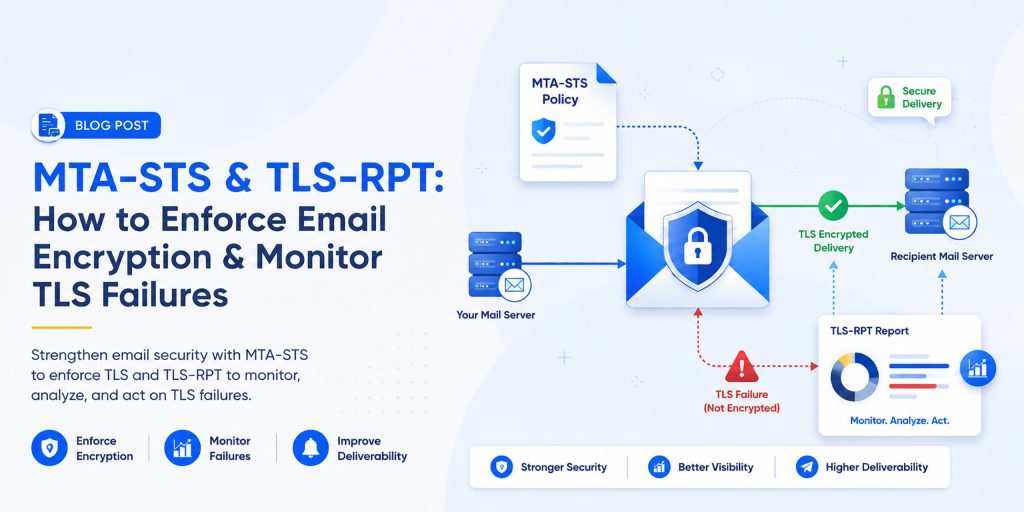
This is where MTA-STS (Mail Transfer Agent Strict Transport Security) and TLS-RPT (TLS Reporting) become essential. Together, they enforce encryption in transit and give you full visibility into SMTP delivery failures, making them indispensable for any business that takes email security seriously.
Modern businesses also rely on tools like HasheTools to simplify email authentication, DNS validation, and security monitoring. With the right setup and proper visibility into your email infrastructure, you can prevent misconfigurations and ensure your emails are always delivered securely.
What is MTA-STS?
MTA-STS (Mail Transfer Agent Strict Transport Security) is an email security standard that forces SMTP connections between mail servers to use TLS encryption. It prevents attackers from intercepting messages or forcing a downgrade to an unencrypted connection.
Without MTA-STS: The Risks
- Emails may silently fall back to unencrypted SMTP
- Attackers can perform SMTP downgrade attacks to strip encryption
- Sensitive business data is exposed during transit
- No mechanism to reject insecure delivery attempts
With MTA-STS: The Benefits
- All inbound emails must arrive over TLS-encrypted connections
- Insecure connections are rejected, not just logged
- Man-in-the-middle attacks are blocked at the protocol level
- Works seamlessly alongside SPF, DKIM, and DMARC
What is TLS-RPT?
TLS-RPT (TLS Reporting) is a complementary protocol that automatically delivers failure reports to your inbox whenever a TLS-encrypted connection cannot be established. Think of it as the monitoring dashboard for MTA-STS.
Without TLS-RPT
- TLS failures happen silently; you have no visibility
- Email delivery problems are nearly impossible to debug
- Misconfigurations can go undetected for weeks
With TLS-RPT
- You receive structured JSON reports detailing every TLS failure
- Identify misconfigured mail servers before they cause delivery issues
- Monitor SMTP security posture in real time
- Supports compliance auditing and security documentation
MTA-STS vs. TLS-RPT: Key Differences
Although they work together, they serve fundamentally different purposes:
| Feature | MTA-STS | TLS-RPT |
|---|---|---|
| Purpose | Enforce TLS encryption | Report TLS failures |
| Function | Security enforcement | Monitoring & reporting |
| Action Taken | Blocks insecure email | Sends structured reports |
| Visibility | Silent enforcement | Detailed failure logs |
| Required? | Recommended | Strongly recommended |
Together, they form a complete email transport security system, one enforces, the other reports.
How MTA-STS Works: Step by Step
Step 1: Publish Your MTA-STS Policy File
Host a plain-text policy file at the following URL on your domain:
https://mta-sts.yourdomain.com/.well-known/mta-sts.txt
Example policy file content:
version: STSv1
mode: enforce
mx: mail.yourdomain.com
max_age: 86400
Step 2: Add the MTA-STS DNS TXT Record
Create a DNS TXT record to signal that MTA-STS is active on your domain:
_mta-sts.yourdomain.com TXT “v=STSv1; id=20260101”
The ID value must be updated whenever your policy file changes; it tells the sending servers that the policy has been refreshed.
Step 3: Send Mail Server Checks Your Policy
When another mail server attempts to deliver email to you, it automatically checks your DNS for the MTA-STS record, fetches the policy file from your subdomain, validates your mail server’s TLS certificate, and then proceeds only if everything matches.
Step 4: Secure Delivery or Rejection
- If TLS is valid and verified → email is delivered securely
- If TLS fails or the certificate is invalid → email is rejected (in enforce mode)
How TLS-RPT Works: Step by Step
Step 1: Add the TLS-RPT DNS Record
_smtp._tls.yourdomain.com TXT “v=TLSRPTv1; rua=mailto:reports@yourdomain.com”
Replace reports@yourdomain.com with any mailbox you monitor regularly. You can also send reports to a dedicated analytics service.
Step 2: Mail Servers Generate Reports
Whenever a sending mail server encounters a TLS issue when delivering to your domain, it automatically sends a structured JSON report to your specified address. Reports are sent once per day, per sending domain.
Step 3: Analyze the Reports
Each report contains detailed data, including:
- Number of successful and failed TLS connections
- Certificate validation errors (expired, mismatched, untrusted)
- STARTTLS negotiation failures
- MTA-STS policy violations
- Details of the sending mail server
How to Configure MTA-STS & TLS-RPT: Full Setup Guide
Step 1: Create the MTA-STS Subdomain
Create a subdomain in your DNS and point it to a web server that can serve HTTPS content:
mta-sts.yourdomain.com → your web server (HTTPS required)
Step 2: Upload the Policy File
Create and upload mta-sts.txt to your web server at the exact path:
/.well-known/mta-sts.txt
Full example policy:
version: STSv1
mode: enforce
mx: mail.yourdomain.com
mx: mail2.yourdomain.com
max_age: 604800
Step 3: Add MTA-STS DNS Record
_mta-sts.yourdomain.com TXT “v=STSv1; id=20260108”
Step 4: Add TLS-RPT DNS Record
_smtp._tls.yourdomain.com TXT “v=TLSRPTv1; rua=mailto:reports@yourdomain.com”
Step 5: Validate Your Setup
Use free tools to verify your configuration before going live:
- MXToolbox: check DNS record propagation
- Google Admin Toolbox: test MTA-STS policy retrieval
- dmarcian TLS-RPT analyzer: validate TLS report parsing
- Wait 24–48 hours for DNS propagation globally
MTA-STS vs. STARTTLS: Why the Upgrade Matters
| Feature | STARTTLS | MTA-STS |
|---|---|---|
| Encryption Type | Opportunistic | Enforced |
| Downgrade Protection | None easily bypassed | Strong rejects insecure |
| Certificate Validation | Optional | Mandatory |
| Attack Resistance | Vulnerable to MITM | Protected |
| Delivery Monitoring | None | Full (with TLS-RPT) |
STARTTLS upgrades connections to TLS if available, but an attacker can silently strip it and force plaintext delivery. MTA-STS eliminates this vulnerability.
Common MTA-STS & TLS-RPT Issues and How to Fix Them
1. Certificate Mismatch
Your MX server’s TLS certificate must match the hostname listed in your MTA-STS policy. Mismatches will cause legitimate emails to be rejected in enforce mode.
| Fix: Ensure your SSL certificate covers the exact MX hostnames in your policy file. Use wildcard certs or SAN certificates if needed. |
2. Incorrect or Missing MX Records
If your policy file lists MX hostnames that don’t match your actual DNS MX records, senders will be unable to validate your configuration.
| Fix: Run nslookup -type=MX yourdomain.com and verify every host listed in your mta-sts.txt matches exactly. |
3. Policy File Not Accessible Over HTTPS
The mta-sts.txt file must be served over HTTPS (not HTTP) with a valid certificate. If it returns a 404 or an HTTP redirect, MTA-STS will not activate.
| Fix: Test by visiting https://mta-sts.yourdomain.com/.well-known/mta-sts.txt in a browser; you should see the plain-text policy. |
4. Forgetting to Update the Policy ID
If you update your policy file but forget to change the ID value in the DNS TXT record, mail servers will continue caching the old policy.
| Fix: Always increment the ID (e.g., use a date like 20260108) whenever you make any change to your policy file. |
Best Practices for Email Transport Security
- Always start with mode: testing, collect data before enforcing
- Move to mode: enforce only after verifying reports show no legitimate failures
- Use valid, non-expired SSL/TLS certificates on all MX servers
- Monitor TLS-RPT reports weekly, set calendar reminders
- Update the policy ID value every time you modify the policy file
- Combine MTA-STS with SPF, DKIM, and DMARC for full email security coverage
- Keep MX server software updated to support modern TLS versions (1.2 minimum, 1.3 preferred)
- Audit DNS records quarterly to catch drift and misconfigurations early
Real-World Use Case: Financial Services Company
Consider a financial company sending invoices, contracts, and sensitive client data via email every day.
| Scenario | Without MTA-STS + TLS-RPT | With MTA-STS + TLS-RPT |
|---|---|---|
| Email Security | Vulnerable to interception | Fully encrypted in transit |
| Attack Exposure | MITM attacks possible | Downgrade attacks blocked |
| Issue Visibility | Problems invisible | Failures reported instantly |
| Compliance Risk | High audit failures are likely | Low documented & auditable |
| Client Trust | No verifiable assurance | Provable encryption standard |
For regulated industries, financial services, healthcare, legal, and government, MTA-STS and TLS-RPT are not optional enhancements. They are baseline security requirements.
Frequently Asked Questions (FAQ)
Does MTA-STS replace DMARC, SPF, or DKIM?
No. MTA-STS operates at a different layer. SPF, DKIM, and DMARC verify email identity and prevent spoofing. MTA-STS ensures the transport channel itself is encrypted. You need all of them for comprehensive protection.
How long does it take for MTA-STS to take effect?
DNS propagation typically takes 24–48 hours globally. However, sending mail servers also cache your policy for the duration of max_age (in seconds) specified in your policy file. Use a lower max_age during testing.
Will MTA-STS cause legitimate emails to be blocked?
Only if your TLS configuration is incorrect. This is why starting with mode: testing is critical; it lets you identify any misconfigurations before switching to enforce mode, where non-TLS connections are actively rejected.
Can I use TLS-RPT without MTA-STS?
Yes. TLS-RPT works independently and will report TLS failures even if MTA-STS is not implemented. However, the two protocols are designed to work together and provide maximum value when used in combination.
What format are TLS-RPT reports delivered in?
Reports are delivered as JSON files, often compressed as .gz attachments. You can parse them manually, use a spreadsheet, or use dedicated tools like DMARCian or Valimail to visualize the data.
Does MTA-STS affect outbound email?
MTA-STS only governs how other mail servers deliver email to your domain (inbound). However, if you send an email to domains that have MTA-STS enabled, your outgoing mail server must support TLS, or delivery will fail.
Conclusion
MTA-STS and TLS-RPT represent a major step forward in modern email security. While traditional protocols like STARTTLS rely on opportunistic encryption, they still leave room for downgrade attacks, misconfigurations, and a lack of visibility. MTA-STS solves the enforcement problem by ensuring that all inbound email connections are securely encrypted, while TLS-RPT provides the monitoring layer needed to detect and analyze any TLS-related delivery issues.
Together, these protocols create a strong, transparent, and enforceable email transport security system that works alongside SPF, DKIM, and DMARC to protect both identity and data in transit. For businesses that depend on email for sensitive communication, such as contracts, invoices, and client data, this is no longer optional; it is a required security standard in 2026.
Implementing and managing these configurations can be complex, especially when dealing with DNS records, policy files, and TLS validation. This is where HasheTools helps simplify the process by providing essential tools for DNS checks, email authentication validation, and security troubleshooting in one place. It allows businesses to quickly identify issues, validate configurations, and maintain a strong email security posture without unnecessary complexity.