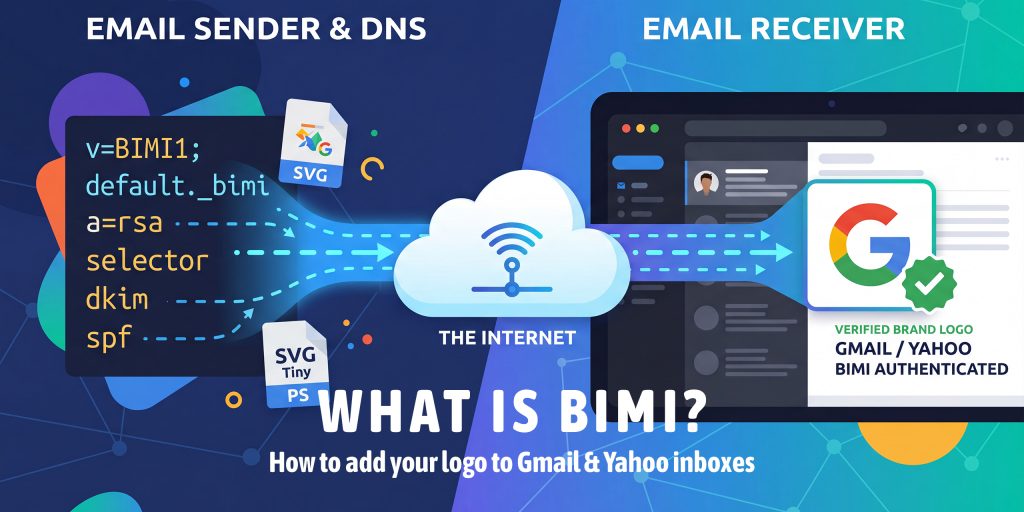
BIMI (Brand Indicators for Message Identification) is an email standard that lets you display your brand’s verified logo directly in the inbox, next to your email subject line, in Gmail, Yahoo Mail, Apple Mail, and other supporting providers. It requires DMARC enforcement (p=quarantine or p=reject) and, for Gmail and Apple Mail, a Verified Mark Certificate (VMC). BIMI turns email authentication into a visible trust signal that boosts open rates and protects your brand from impersonation.
What is BIMI?
BIMI stands for Brand Indicators for Message Identification. It is an open email specification published by the AuthIndicators Working Group that allows organizations to display a verified brand logo in the inbox avatar slot, the small image next to the sender name and subject line.
In plain terms: BIMI puts your logo in the inbox before your email is even opened. Instead of seeing a generic initial or a grey placeholder, your recipients see your real brand logo, verified and authenticated.
BIMI sits at the top of the email authentication stack. It builds on three lower-level protocols, SPF, DKIM, and DMARC, and adds a visual, human-readable layer of trust on top of them.
| Protocol | Checks | Visible to Recipients? | Required for BIMI? |
|---|---|---|---|
| SPF | Sender IP authorization | No | Yes (indirectly via DMARC) |
| DKIM | Message integrity signature | No | Yes (indirectly via DMARC) |
| DMARC | From: domain alignment + policy | No | Yes, must be enforced |
| BIMI | Brand logo display | Yes, logo in inbox | The reward layer |
The key insight: BIMI is not a standalone tool. It is the visible payoff for correctly implementing the full email authentication stack. You cannot shortcut to BIMI; the foundation must be solid first.
BIMI vs. Google Profile Photos: You may have seen sender avatars in Gmail that come from Google account profile photos or company logos set through Google Workspace. These are different from BIMI. BIMI logos are cryptographically verified against your domain via a Verified Mark Certificate; they cannot be faked or impersonated by another sender.
Why BIMI Matters in 2026
Email inboxes are more crowded and more dangerous than ever. AI-generated phishing emails now closely mimic legitimate brand communications. Recipients are increasingly skeptical of emails from brands they don’t immediately recognize visually.
BIMI addresses this from multiple angles simultaneously:
For Brand Trust & Recognition
- Instant visual recognition: Your logo appears before the email is opened, and recipients know it’s really you at a glance
- Verified authenticity: The VMC proves the logo belongs to your trademarked brand; it cannot be spoofed
- Reduced inbox anxiety: 53% of consumers say they’ve received legitimate brand emails they didn’t trust (Sinch). BIMI eliminates that doubt
For Email Performance
- Open rate lift: Research shows an average 10% increase in open rates for BIMI-enabled senders
- Inbox differentiation: Your email stands out visually against competitors who haven’t implemented BIMI
- Spam filter confidence: BIMI-enabled domains signal strong authentication hygiene, which can positively affect deliverability scoring
For Security
- Anti-impersonation: Attackers cannot display your verified logo without your VMC private key
- DMARC enforcement prerequisite: Getting to BIMI forces you to fully implement DMARC at p=reject, which protects your domain from spoofing entirely
- Domain reputation signal: Inbox providers treat BIMI-enabled domains as high-trust senders
2026 Competitive Reality: Fortune 500 companies are at 81.2% BIMI readiness. If your competitors’ logos show up in Gmail and yours don’t, that’s a visible trust gap. BIMI is moving from early-adopter advantage to table-stakes expectation for professional email senders.
DNS Records for ns1.dns-parking.com
How BIMI Works: Step by Step
When you send an email to a BIMI-supporting inbox provider, this is what happens behind the scenes:
- You send an email from your authenticated domain
- The receiving mail server checks SPF and DKIM; both must pass for your domain
- The server evaluates your DMARC policy; it must be p=quarantine or p=reject
- If DMARC passes, the server looks up your BIMI record at default._bimi.yourdomain.com
- The BIMI record contains a URL to your SVG logo and, optionally, your VMC certificate URL
- The inbox provider fetches your SVG logo from the URL in your BIMI record
- If a VMC is present, it is validated against your domain to confirm the logo is legitimately yours
- Your logo appears in the inbox next to your email, verified and authenticated
Why Providers Check DMARC First: Without DMARC enforcement, any attacker could publish a BIMI record claiming your logo. DMARC enforcement is the gate that proves you control the domain and all email from it is authenticated. BIMI without DMARC would be a spoofing attack vector; that’s why the requirement exists.
Which Inbox Providers Support BIMI?
BIMI support has expanded significantly since 2022. Here is the current state as of 2026:
| Inbox Provider | VMC Required? | DMARC Policy Needed | Notes |
| Gmail | Required | p=quarantine or p=reject | Requires VMC from DigiCert or Entrust. Largest user base, highest BIMI value. |
| Yahoo Mail | Optional | p=quarantine or p=reject | Supports self-asserted BIMI without VMC if the domain reputation is sufficient. |
| Apple Mail | Required | p=quarantine or p=reject | Requires VMC. Supported since iOS 16 / macOS Ventura. |
| Fastmail | Optional | p=quarantine or p=reject | Supports BIMI without VMC. |
| Cloudmark | Optional | p=quarantine or p=reject | Supports BIMI, VMC optional. |
| La Poste | Optional | p=quarantine or p=reject | French provider, BIMI, supported since Aug 2022. |
| Zone Webmail | Required | p=quarantine or p=reject | VMC required for logo display. |
| Outlook/M365 | Pending | N/A | Microsoft has announced BIMI support, but full rollout is still limited as of 2026. |
Practical priority: Focus on Gmail first, it has the largest user base and the clearest requirements. Yahoo is a strong second because you can display logos there without a VMC while you pursue Gmail support.
BIMI Requirements: What You Need Before You Start
BIMI has a clear prerequisite chain. Think of it as a checklist you work through from bottom to top:
- SPF record published: all sending services authorized on your root domain
- DKIM configured: every platform sending as your domain signs messages with DKIM
- DMARC published: and escalated to p=quarantine or p=reject (p=none does not qualify)
- DMARC pass rate consistently above 98%: check your aggregate reports
- SVG logo in SVG Tiny PS format: hosted at a permanent HTTPS URL
- VMC obtained (for Gmail & Apple Mail): from DigiCert or Entrust
- BIMI DNS TXT record published at default._bimi.yourdomain.com
Common Mistake: Jumping to BIMI Too Early: The most common BIMI setup failure is attempting it before DMARC is fully enforced. If your DMARC is at p=none, or your pass rate is below 95%, BIMI logos will not display in Gmail, even with a valid VMC. Complete the DMARC escalation path first, then pursue BIMI.
How to Run a Traceroute (tracert) Command
The Verified Mark Certificate (VMC) Explained
What is a VMC?
A Verified Mark Certificate (VMC) is a digital certificate, similar in concept to an SSL certificate, that cryptographically verifies that a logo belongs to the trademarked owner of a domain. It is issued by authorized Certificate Authorities (CAs) after validating your trademark registration.
The VMC is what makes BIMI trusted. Without it, any domain could claim any logo. The VMC proves that the logo in your BIMI record belongs to your organization’s registered trademark.
VMC Requirements
- Registered trademark: You must have a registered trademark (not just a pending application) for your logo in at least one major trademark jurisdiction (USPTO, EUIPO, UKIPO, CIPO, IP Australia, INPI, or NIPO)
- SVG Tiny PS logo: The logo must exactly match your trademarked image and be in SVG Tiny PS format
- Authorized CA: VMCs are currently issued by DigiCert (digicert.com/verified-mark-certificates) and Entrust (entrust.com)
- Domain ownership: You must prove control of the domain for which the VMC is issued
VMC Cost & Renewal
VMC certificates typically cost between $1,200–$1,500 USD per year from DigiCert or Entrust. They must be renewed annually. For organizations sending meaningful email volume, the open rate and brand trust improvements make this cost-effective, but for very small senders (under a few thousand emails/month), the ROI may not yet justify it.
What is a CMC?
CMC (Common Mark Certificate) is a newer alternative to VMC that does not require a registered trademark. It is supported by some providers (notably Apple Mail) and verifies brand identity through other means. As of 2026, CMC adoption among inbox providers is still growing. VMC remains the primary standard for Gmail support.
Strategy: Start with Yahoo, While Getting Your VMC: If you don’t have a VMC yet, don’t wait. Publish your BIMI record without the VMC certificate URL (omit the a= tag). Yahoo Mail and Fastmail will display your logo based on domain reputation alone. This gives you immediate BIMI benefits while your VMC application is in progress.
How to Prepare Your SVG Logo for BIMI
One of the most common BIMI failures comes from using an incorrect SVG format. BIMI doesn’t accept just any SVG; it requires a specific subset called SVG Tiny PS (Portable Secure). Here’s exactly what that means and how to get it right.
SVG Tiny PS Requirements
- Format: SVG Tiny 1.2, Portable/Secure profile (SVG Tiny PS)
- Shape: Must be a perfect square with equal width and height (e.g., 300×300 viewBox)
- Background: Must have a solid, opaque background; transparent backgrounds are not allowed
- No external references: No linked images, external fonts, JavaScript, animations, or raster images embedded inside
- Single file: Fully self-contained, all paths and shapes defined within the SVG file
- File size: Keep under 32KB for best compatibility
- MIME type: Must be served with Content-Type: image/svg+xml (not text/plain or application/xml)
What is NOT Allowed in BIMI SVGs
- Transparent or semi-transparent backgrounds
- Raster images (PNG, JPG) embedded inside the SVG
- JavaScript or scripting of any kind
- Animations (including CSS animations)
- External font references (@font-face with external URLs)
- Filters and effects (blur, drop-shadow, etc.)
- Linked external resources (xlink:href to external files)
How to Create a BIMI-Compliant SVG
Option 1: Adobe Illustrator:
- Create or open your Square logo in Illustrator
- Ensure the artboard is perfectly square
- Add a solid background rectangle if none exists
- Go to File → Save As → SVG → click More Options → set Profile to SVG Tiny 1.2
- Validate the output with a BIMI SVG validator
Option 2: Inkscape (free):
- Open your logo in Inkscape
- Set Document Properties to a square canvas
- Add a solid background rectangle
- File → Save As → SVG Tiny 1.2
- Manually review the XML to remove any disallowed attributes
Option 3: Professional BIMI SVG services:
Services like BIMI Inspector (bimigroup.org/creating-bimi-svg-logo-files) provide validation tools and guidelines. Some VMC providers (DigiCert, Entrust) offer SVG conversion assistance as part of the certificate process.
Hosting Your BIMI SVG
- URL must be HTTPS: plain HTTP will cause BIMI to fail silently
- No authentication required: the file must be publicly accessible without login or redirect
- No redirects: serve the SVG directly at the URL in your BIMI record
- Correct Content-Type header: Content-Type: image/svg+xml
- No hotlink protection: inbox providers’ servers must be able to fetch the file
- Stable URL: if you move the file, update your BIMI record. Broken logo URLs = no BIMI display
Step-by-Step: Add BIMI to Gmail
Confirm you have: (1) DMARC at p=quarantine or p=reject with pct=100, (2) DMARC pass rate consistently above 98%, check your DMARC aggregate reports, (3) SVG logo in SVG Tiny PS format hosted at an HTTPS URL, (4) VMC from DigiCert or Entrust with the .pem certificate file hosted at an HTTPS URL.
Step 1: Obtain Your VMC
- Go to DigiCert (digicert.com) or Entrust (entrust.com)
- Select ‘Verified Mark Certificate’ and begin the application
- Submit your trademark registration details (jurisdiction + registration number)
- Upload your SVG Tiny PS logo file for validation
- Complete domain validation (DigiCert will verify you control the domain)
- Wait for certificate issuance, typically 3–10 business days
- Download the .pem certificate file
Step 2: Host Your Certificate
- Upload your VMC .pem file to a stable HTTPS URL on your website
- Example: https://yourdomain.com/bimi/vmc.pem
- Ensure the file is publicly accessible with no authentication or redirect
- Confirm Content-Type is application/x-pem-file
Step 3: Host Your SVG Logo
- Upload your BIMI-compliant SVG logo to a stable HTTPS URL
- Example: https://yourdomain.com/bimi/logo.svg
- Test that the URL is publicly accessible in an incognito browser window
- Confirm Content-Type header is image/svg+xml
Step 4: Publish Your BIMI DNS Record
- Log in to your DNS provider (Cloudflare, Route 53, GoDaddy, Namecheap, etc.)
- Create a new TXT record with:
| Field | Value |
|---|---|
| Name / Host | default._bimi (some providers add your domain automatically; check their docs) |
| Type | TXT |
| Value | v=BIMI1; l=https://yourdomain.com/bimi/logo.svg; a=https://yourdomain.com/bimi/vmc.pem |
| TTL | 3600 (1 hour) or your provider’s default |
| DNS TXT record: default._bimi.yourdomain.com |
| v=BIMI1; l=https://yourdomain.com/bimi/logo.svg; a=https://yourdomain.com/bimi/vmc.pem |
Step 5: Verify with HasheTools
- Go to hashetools.com and open the BIMI Lookup tool
- Enter your domain name and click Check BIMI
- The tool will retrieve and validate: BIMI record syntax, SVG URL accessibility, VMC certificate validity, DMARC compliance
- Address any warnings or errors before sending a test email
Step 6: Send a Test Email to Gmail
- Send an email from your domain to a Gmail account you control
- Check the inbox; your logo should appear in the avatar circle next to the sender’s name
- Allow up to 24–48 hours for Gmail’s systems to pick up and cache your BIMI record
- If the logo doesn’t appear: use Gmail’s Postmaster Tools to check your domain reputation; low-reputation domains may not qualify even with a valid VMC
Step-by-Step: Add BIMI to Yahoo Mail
Yahoo Mail is the easiest path to BIMI because it supports logo display without a VMC, provided your domain has sufficient sending reputation with Yahoo’s filter systems.
Yahoo BIMI Without a VMC: You can display your logo in Yahoo inboxes by publishing a BIMI record with just the l= (logo URL) tag and no a= (VMC) tag. Yahoo evaluates your domain’s sending reputation and engagement history to decide whether to show the logo. This makes Yahoo the ideal first step in your BIMI rollout.
Step 1: Confirm DMARC Enforcement
Check your DMARC record using HasheTools DMARC Lookup. Confirm the policy is p=quarantine or p=reject. Yahoo will not show BIMI logos for domains at p=none.
Step 2: Prepare and Host Your SVG Logo
Follow the same SVG Tiny PS format requirements covered in Section 7. Host the SVG at a publicly accessible HTTPS URL with the correct Content-Type header.
Step 3: Publish Your BIMI Record (No VMC Required for Yahoo)
| DNS TXT record, default._bimi.yourdomain.com (Yahoo, no VMC) |
| v=BIMI1; l=https://yourdomain.com/bimi/logo.svg |
The a= tag (VMC URL) is optional for Yahoo. If you already have a VMC, include it; it won’t hurt. If you don’t have one yet, the record above is sufficient to request the Yahoo logo display.
Step 4: Build Yahoo Sending Reputation
Yahoo’s decision to display your BIMI logo is also influenced by your sending reputation with Yahoo’s filter systems. To build a strong reputation:
- Maintain low spam complaint rates (below 0.1% ideally)
- Send to engaged subscribers who open and click
- Honor unsubscribes promptly
- Use consistent sending volumes and patterns
- Warm up new sending IPs gradually
Step 5: Test and Monitor
- Send a test email from your domain to a Yahoo Mail account you control
- Check whether your logo appears next to your sender name
- If it doesn’t appear immediately, give it 7–14 days. Yahoo caches BIMI lookups and reputation signals, which take time to accumulate
- Use Yahoo Sender Support (sendersupport.yahoo.com) to check for deliverability issues affecting logo display
CNAME Lookup: How to Check, Verify, and Understand CNAME Records
Your BIMI DNS Record: Syntax & Examples
Full BIMI Record Syntax
| DNS TXT, default._bimi.yourdomain.com |
| v=BIMI1; l=https://yourdomain.com/bimi/logo.svg; a=https://yourdomain.com/bimi/vmc.pem |
| Tag | Example | Meaning |
|---|---|---|
| v=BIMI1 | v=BIMI1 | Required. Declares this is a BIMI record. Must be first. |
| l= | l=https://domain.com/logo.svg | URL to your SVG Tiny PS logo. Must be HTTPS. No redirects. |
| a= | a=https://domain.com/vmc.pem | URL to your VMC .pem file. Required for Gmail & Apple Mail. Omit for Yahoo-only. |
BIMI Record Examples
Full BIMI with VMC (Gmail + Yahoo + Apple Mail):
| DNS TXT: default._bimi.yourdomain.com |
| v=BIMI1; l=https://yourdomain.com/bimi/logo.svg; a=https://yourdomain.com/bimi/vmc.pem |
Yahoo-only BIMI (no VMC):
| DNS TXT: default._bimi.yourdomain.com |
| v=BIMI1; l=https://yourdomain.com/bimi/logo.svg |
Subdomain-specific BIMI (for newsletters sent from newsletter.yourdomain.com):
| DNS TXT: default._bimi.newsletter.yourdomain.com |
| v=BIMI1; l=https://yourdomain.com/bimi/newsletter-logo.svg; a=https://yourdomain.com/bimi/vmc.pem |
Temporarily disabling BIMI (while updating logo/VMC):
| DNS TXT: default._bimi.yourdomain.com |
| v=BIMI1; l= |
BIMI Record Name Format: The BIMI record must be published at exactly default._bimi.yourdomain.com, where ‘default’ is the selector (like DKIM selectors). Most deployments use ‘default’. Some DNS providers auto-append your domain; enter just ‘default._bimi’ as the host in that case. Check your DNS provider’s documentation.
How to Verify Your BIMI Record with HasheTools
After publishing your BIMI record, use HasheTools’ free tools to confirm everything is correctly configured:
| HasheTools Tool | What It Checks for BIMI |
|---|---|
| BIMI Lookup | Retrieves your BIMI DNS record. Validates l= and a= URLs are accessible. Checks VMC validity. Shows how the logo will appear. Flags errors. |
| DMARC Lookup | Confirms your DMARC policy is at p=quarantine or p=reject, the mandatory BIMI prerequisite. |
| DNS Lookup → TXT | View all TXT records on your domain to confirm the BIMI record is published and correctly formatted. |
| DKIM Lookup | Verifies DKIM is configured, required for DMARC to pass, which is required for BIMI to activate. |
| Blacklist Check | Confirms your sending IPs are not on spam blocklists, critical for maintaining the reputation that BIMI requires. |
| MTA-STS Lookup | Validates secure email transport, part of a complete email authentication setup that supports BIMI. |
Manual Verification Commands
You can also verify your BIMI record using command-line tools:
| Terminal: Check BIMI record with dig |
| dig TXT default._bimi.yourdomain.com +short |
| Terminal: Check BIMI record with nslookup |
| nslookup -type=TXT default._bimi.yourdomain.com |
Troubleshooting Common BIMI Problems
Logo Not Showing in Gmail
| Cause | Fix |
|---|---|
| DMARC is not in enforcement | Escalate DMARC from p=none to p=quarantine or p=reject. This is mandatory for Gmail. |
| No VMC or invalid VMC | Obtain a VMC from DigiCert or Entrust. Ensure the .pem file is hosted at the URL in your a= tag. |
| SVG not in SVG Tiny PS format | Re-export your SVG using the SVG Tiny PS profile. Use Adobe Illustrator or Inkscape. Validate with BIMI Inspector. |
| SVG served with the wrong MIME type | Check your web server config. The SVG must be served with Content-Type: image/svg+xml. |
| SVG URL requires authentication | Make the SVG URL publicly accessible without login, cookies, or redirects. |
| Domain reputation too low | Check Google Postmaster Tools. Build reputation by improving engagement and reducing spam complaints. |
| BIMI record not propagated | Wait up to 48 hours after publishing. Use HasheTools DNS Lookup to confirm propagation. |
Logo Not Showing in Yahoo
| Cause | Fix |
|---|---|
| DMARC is not in enforcement | Same as Gmail, p=none will not work. |
| Insufficient sending reputation | Send to engaged Yahoo users consistently over time. Keep spam complaints very low. |
| SVG format issues | Use the same SVG Tiny PS format requirements as Gmail. |
| BIMI record syntax error | Use HasheTools BIMI Lookup to check for syntax issues in your DNS record. |
VMC Validation Errors
- ‘Certificate not found at URL’: Ensure the a= URL in your BIMI record points directly to the .pem file with no redirect.
- ‘Certificate expired’: VMCs must be renewed annually. Check your expiry date and renew with DigiCert or Entrust
- ‘Logo does not match certificate’: The SVG logo in your l= tag must exactly match the logo embedded in your VMC. Reissue the VMC if the logo has changed
- ‘Domain not covered’: The VMC must be issued for the exact domain in your From: address. Wildcard coverage varies by CA
Use BIMI Inspector for Deep Validation: The BIMI Group (bimigroup.org) provides a free BIMI Inspector tool that validates your full BIMI setup, SVG format, DNS record, VMC, and DMARC in one check. Use it alongside HasheTools BIMI Lookup for comprehensive verification before launch.
BIMI FAQs
Do I absolutely need a VMC for BIMI?
You need a VMC to display your logo in Gmail and Apple Mail. Yahoo Mail and Fastmail support BIMI without a VMC, based on domain reputation. If you don’t have a trademark registration, you can still benefit from Yahoo BIMI while working toward VMC eligibility.
How long does BIMI setup take from start to finish?
If you already have DMARC at p=reject, the technical BIMI setup (SVG + DNS record) can be done in a day. Obtaining a VMC typically takes 3–10 business days, depending on trademark verification. If you need to escalate DMARC first, plan for 4–12 weeks for the full authentication journey.
Will BIMI affect my email deliverability?
BIMI itself doesn’t directly change deliverability scoring, but the DMARC enforcement required to enable it does. Fully enforced DMARC at p=reject, combined with proper SPF and DKIM alignment, significantly improves how inbox providers perceive your domain’s trustworthiness, which can positively impact inbox placement over time.
Can I use BIMI on subdomains?
Yes. Publish a BIMI TXT record at default._bimi.subdomain.yourdomain.com for emails sent from that subdomain. Each subdomain needs its own BIMI record and its own DMARC policy (unless the parent domain policy covers subdomains via the sp= tag).
What is the difference between BIMI and a Google Avatar?
Google Workspace profile photos and manually set sender avatars are informal; they can be set by anyone. BIMI logos are cryptographically verified through a VMC and can only be displayed when the domain passes DMARC authentication. A BIMI logo carries a trust verification that an avatar does not.
Can multiple domains use the same VMC?
No. A VMC is issued for a specific domain and covers exactly that domain (or optionally a wildcard). Each domain that sends BIMI-authenticated email needs its own VMC.
Do I need to do anything special in Gmail to enable BIMI?
No action is needed on the Gmail side. Gmail automatically checks for BIMI records when evaluating incoming emails from domains that pass DMARC. The setup is entirely on your domain’s DNS and certificate side.
How often do I need to update my BIMI record?
Only when something changes: if you update your logo, change the SVG URL, renew your VMC (annually), or switch VMC providers. BIMI records themselves don’t expire; only the VMC certificate does.
Conclusion
BIMI (Brand Indicators for Message Identification) is no longer just a “nice-to-have”; it’s becoming a standard for trusted email communication in 2026. By displaying your verified logo in inboxes like Gmail, Yahoo Mail, and Apple Mail, BIMI boosts brand recognition, improves open rates, and protects your domain from spoofing and phishing.
However, BIMI is the reward for a properly authenticated email setup: SPF, DKIM, and DMARC must be correctly configured and enforced before your logo can appear. For Gmail and Apple Mail, a Verified Mark Certificate (VMC) ensures your logo is cryptographically verified, while Yahoo and Fastmail allow BIMI without a VMC based on domain reputation.
In short, implementing BIMI signals to recipients and inbox providers that your emails are authentic and trustworthy, giving your brand a visible edge in crowded inboxes. Start with DMARC enforcement, prepare your SVG Tiny PS logo, obtain a VMC if needed, and publish your BIMI DNS record. The payoff is a stronger brand presence and a safer email experience for your audience.